
How to Test a PBR Material Generator
Score generated PBR materials channel by channel (base colour, normal, roughness, metallic, AO, and height) against a coherent ground-truth set.
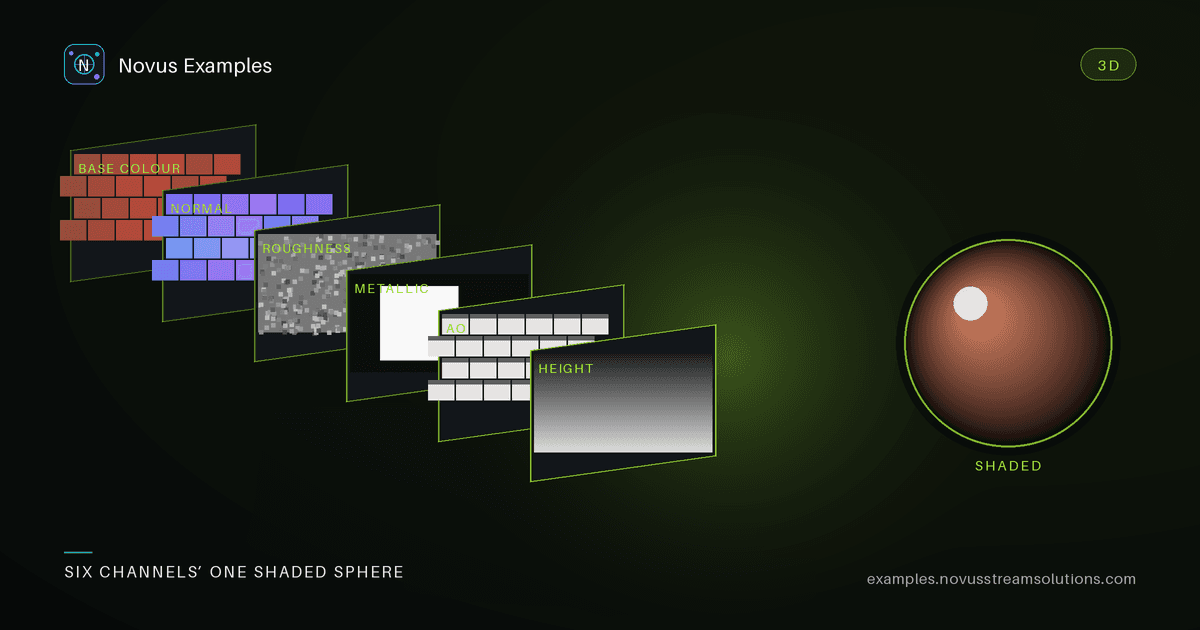
A physically-based material isn't a texture. It's a set of channels that have to agree: base colour, tangent-space normal, roughness, metallic, ambient occlusion, and height. A material generator can produce a gorgeous albedo and a normal map that points the wrong way, and the two only reveal the conflict once they're lit. Testing a generator means checking each channel and checking that they're consistent with each other.
Each material in the PBR set ships all six channels, generated together so they describe one surface. For a brick wall you get a base colour, a normal map, a roughness map, plus metallic, ambient occlusion, and height. Feed the base colour (or a prompt) to your generator and score each predicted channel against the matching reference.
Different channels need different metrics:
- Base colour: perceptual colour error (ΔE in a linear or Lab space), not raw RGB distance. Watch for lighting baked into the albedo. A base-colour map should have no shadows.
- Normal: mean angular error between predicted and reference normals (decode RGB → vector first). A low pixel-difference can still hide large angular error, so measure the angle.
- Roughness / metallic / AO: these are scalar maps: use MAE plus a histogram check. A generator that outputs a flat grey roughness map "matches on average" while carrying no detail.
- Height: gradient error, since height feeds normals and parallax; the derivative matters more than the absolute value.
The most useful PBR test isn't per-channel at all. It's whether the channels agree. Derive a normal map from the predicted height and compare it with the predicted normal map: if they disagree, the material will look wrong under motion. Confirm the metallic map is near-binary for a dielectric surface like brick or fabric. Confirm crevices that are dark in AO are also low in height. These consistency checks catch the failures a per-channel score misses.
Half the "the generator is broken" reports in this area are decoding bugs in the harness. Four conventions to pin before any metric runs:
- Colour space. Base colour and albedo are stored sRGB-encoded; normal, roughness, metallic, AO, and height are linear data, not colour. Applying an sRGB→linear transform to a roughness map, or failing to apply one to base colour, shifts every value. A viewer that renders the material correctly is not proof, since it applies these transforms for you.
- Normal encoding. Tangent-space normals are packed as
rgb = (xyz + 1) / 2. Unpack to a vector, then renormalise before measuring angles; compression leaves vectors slightly off unit length, and an un-normalised dot product silently reports a wrong angle. - Green-channel direction. OpenGL and DirectX conventions differ in the sign of Y. A generator trained on one and scored against the other produces a normal map that looks plausible, scores terribly, and lights inside-out. If your mean angular error is large but the structure looks right, flip green and re-measure before filing a bug.
- Roughness versus glossiness. Some pipelines store the inverse. A perfectly correct map compared against an inverted convention gives a near-maximal error with no other symptom.
A cheap guard for all four: run the reference set against itself through your scoring code. Every metric should come back at zero. Anything else is a harness bug, and finding it there costs minutes instead of days.
The final check is to light both the reference set and the generated set with the same environment and compare the renders. A perceptual diff of the two lit results rolls all six channels into one number that reflects what a user actually sees, a great top-level regression gate, with the per-channel scores underneath to localize any failure.
Every map is deterministic and tileable, so a material lays down seamlessly and the fixture is identical on every machine. That makes your channel scores comparable across model versions and CI runs.
Start with the PBR material set, or the broader texture-map fixtures. Free to use, no attribution required.
Continue this workflow
Was this article helpful?
Found an error? Send a correction.