
How to Test a Monocular Depth-Estimation Model
Measure a depth model against a known depth map, with scale-invariant metrics, edge-aware checks, and reproducible fixtures.
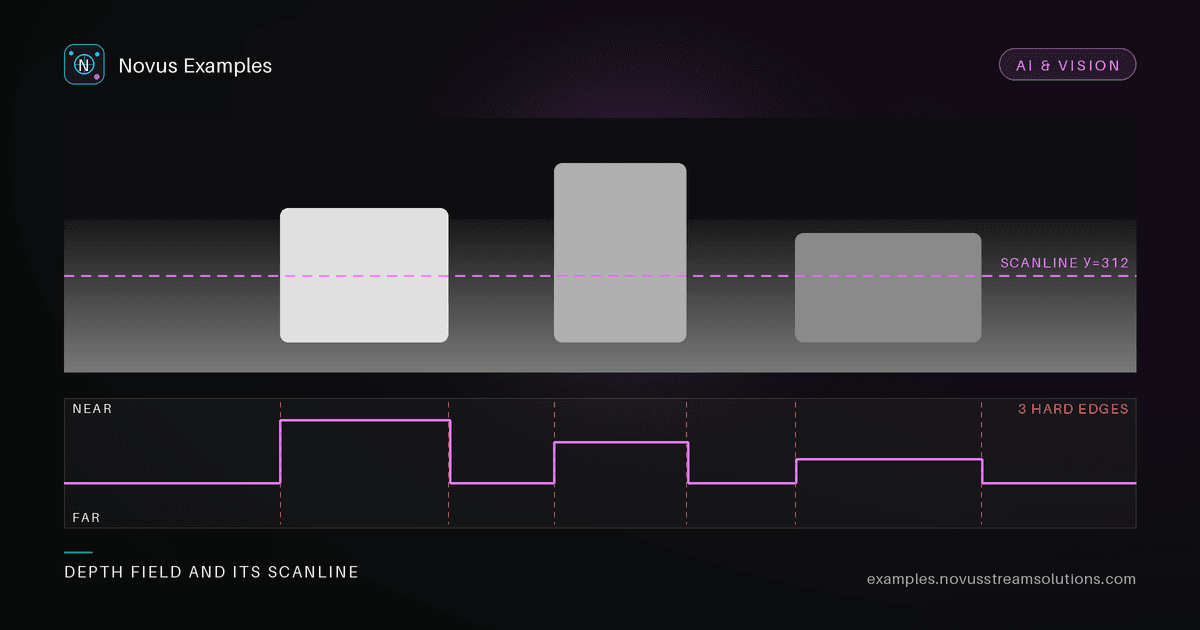
A monocular depth model turns one RGB image into a per-pixel depth map. It looks impressive in a demo and is almost impossible to judge by eye. A plausible-looking depth map can be wrong about relative distances in ways you'd never catch on screen. To test it, you need a scene where the true depth is known, and a metric that turns "close enough?" into a number.
Each scene in the depth-estimation set ships a colour image together with the depth map it was built from. A receding ground plane with the subject brought forward. Run your model on the colour image and you have a predicted depth map to compare against the reference.
Monocular depth is inherently up to scale and shift. A model can be perfectly right about the shape of the scene while being off by a global multiplier. So don't compare raw values. Align first, then measure:
- Scale-invariant RMSE / AbsRel after a least-squares fit of prediction to reference. This forgives the global scale ambiguity and measures the error that actually matters.
- δ<1.25 accuracy: the fraction of pixels whose ratio to the ground truth is within a threshold. It's the standard "how many pixels are basically right" number.
- Edge-aware error near depth discontinuities, where depth models most often smear the boundary between subject and background. Weight the error higher along the mask edge.
Report a couple of these together. A model can win on average error while blurring every depth edge; watching a boundary metric alongside the global one catches that.
The single most common source of nonsense numbers in a depth harness is comparing a disparity map against a depth map. Many popular models emit inverse depth (disparity), where larger values mean nearer; a ground-truth depth map is usually the opposite. Align the two and the fit will happily produce a negative scale factor, after which every metric is meaningless but nothing errors.
Guard against it explicitly:
- After the least-squares alignment, assert the scale factor is positive. A negative fit means one side is inverted: fix the convention rather than accepting the number.
- Sanity-check a known pair of pixels: pick one clearly on the subject and one on the far ground plane, and assert the ordering matches the convention you think you are in.
- Do the alignment in the space the model outputs. Fitting in disparity space and reporting metrics in depth space (or vice versa) changes the result, because the transform between them is non-linear.
Watch the far plane too. Inverse depth compresses distant values into a narrow band, so errors far from the camera barely register in disparity space and dominate in depth space. If your scene has a receding ground plane, report error banded by distance rather than as one figure, that is where the two conventions disagree most.
A single flat scene proves little. What separates a real depth model from a texture-correlated guesser is whether it gets relative ordering right: subject in front of ground, ground receding with distance. Check that the subject region is consistently nearer than the background, and that the ground plane's depth increases monotonically toward the top of the frame.
Pair depth testing with the broader conditioning set if you're feeding predicted depth into a downstream generator, then a depth error becomes visible as a structure error in the generated image, which is a second, independent check.
The depth references are generated deterministically from the same source as the colour image, so the fixture is byte-identical everywhere. Fixed inputs mean your scale-invariant error is comparable across model versions and CI runs, and a regression always reproduces on the exact same scene.
Start with the depth-estimation set, or browse the whole Images library for more paired fixtures. Free to use, no attribution required.
Continue this workflow
Try the workflow
Was this article helpful?
Found an error? Send a correction.