
Why Your Browser Export Loses Its Fonts and Images
SVG rendered through an img element runs in secure static mode and refuses every external resource. Here is why exports silently lose type and pictures, how to embed them, and how to test that it worked.
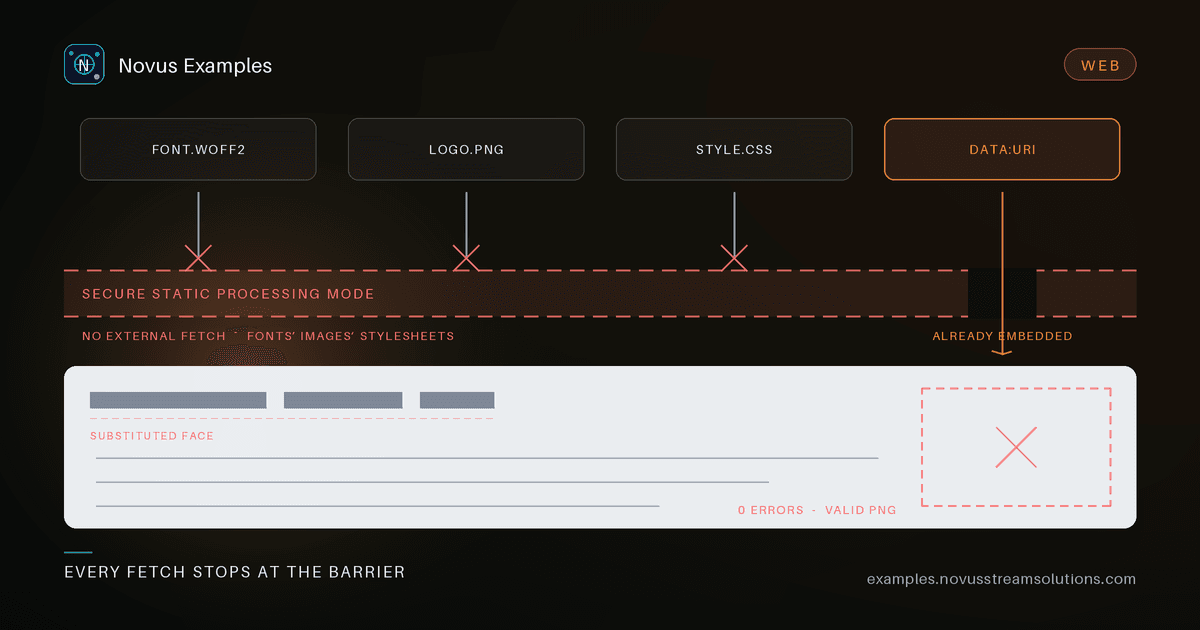
Client-side export usually follows the same three steps. Build the artwork as SVG, load that SVG into an Image, draw it onto a canvas, and read the canvas back as a PNG. It is a good pipeline: no server, no upload, no round trip, and the vector source re-rasterises cleanly at any size.
It also has a failure mode that is unusually hard to notice. The download works. The file opens. The dimensions are right. The type is in a different face than the one on screen, or an image layer is simply absent — and nothing anywhere reported an error.
The cause is a rule most people meet for the first time in exactly this situation.
When an SVG document is referenced by an HTML img element — or by any CSS property that takes an image value — it is processed in what the SVG integration spec calls secure static processing mode. Scripts do not run, animations do not run, and, critically, the document may not load external resources.
"External" here does not mean cross-origin. It means anything the SVG has to go and fetch:
@font-facesources pointing at a URL, including same-origin ones;<image href="/logo.png">;- external stylesheets;
- anything referenced through a
useelement in another file.
Browsers have behaved this way for a long time and for good reason — Mozilla's bug on it dates to 2011 — because an SVG that could fetch arbitrary resources while being treated as an inert image is a privacy and redirector problem.
The consequence for an export pipeline is specific: your live canvas and your exported canvas do not have the same capabilities. Inline SVG in the document is a normal part of the DOM and fetches whatever it likes. The same markup, serialised and handed to new Image(), cannot fetch a thing.
That is the whole bug. On screen the headline is in your brand face because the page loaded the font. In the export the font request never happens, the family name resolves to nothing, and the text falls back to whatever the rasteriser has — usually a system sans. No exception, no console warning, no failed network entry. A silent substitution.
The fix is to make the SVG genuinely self-contained. Anything referenced by URL has to become a data: URI before it goes anywhere near the Image.
For images, walk the serialised tree and swap every href:
async function toDataUrl(src) {
  if (src.startsWith("data:")) return src;
  const res = await fetch(src);
  const blob = await res.blob();
  return await new Promise((resolve) => {
    const fr = new FileReader();
    fr.onload = () => resolve(String(fr.result));
    fr.readAsDataURL(blob);
  });
}

for (const el of clone.querySelectorAll("image")) {
  const href = el.getAttribute("href") ?? el.getAttribute("xlink:href");
  if (href) el.setAttribute("href", await toDataUrl(href));
}
Fonts need the same treatment, one level up: fetch the font file, base64 it, and write an @font-face rule with the data URI as its src into a <style> inside the SVG's <defs>.
const url = await toDataUrl("/fonts/brand-600.woff2");
style.textContent = `@font-face{font-family:'Brand';src:url(${url});font-weight:600;}`;
Two details are easy to get wrong here:
Naming a family is not shipping it. A scene that says font-family: "Brand" and nothing else is the exact silent-fallback case. The face has to travel inside the file.
Subset if you can. A full variable font as base64 can be larger than the artwork. If you control the pipeline, subset to the glyphs actually used before embedding — the difference is often ten to one.
The second most common export defect is the opposite problem: something is in the file that should not be.
Selection outlines, drag handles, layout guides, safe-area rectangles, hover highlights, and debugging attributes all live in the same SVG as the artwork if you let them. Then they rasterise into the export, and the user gets a green rectangle around whichever layer happened to be selected when they clicked the button.
Stripping them afterwards is fragile — it is a blocklist, and blocklists rot. The durable answer is structural: draw editor chrome in a separate, overlaying SVG element that the serialiser never touches. Nothing needs removing because nothing was ever there. Any incidental bookkeeping attributes you do add to the artwork tree (a data-node-id for hit-testing, say) can be dropped in one pass on the clone.
Once the SVG is self-contained, draw it and read it back:
const blob = new Blob([xml], { type: "image/svg+xml;charset=utf-8" });
const url = URL.createObjectURL(blob);
const img = new Image();
await new Promise((res, rej) => { img.onload = res; img.onerror = rej; img.src = url; });
ctx.drawImage(img, 0, 0, width, height);
const png = canvas.toDataURL("image/png");
URL.revokeObjectURL(url);
A self-contained SVG from a blob URL is same-origin, so toDataURL returns normally. The moment you draw a cross-origin bitmap without CORS approval, though, the canvas is tainted and toDataURL, toBlob and getImageData all throw a security error. MDN's guide to CORS-enabled images covers the fix: request it with crossOrigin="anonymous" and make sure the server sends a matching Access-Control-Allow-Origin.
Embedding as data URIs sidesteps this entirely, which is a pleasant side effect of doing it for the font reason anyway.
Two more things that bite at this stage:
- JPEG has no alpha. Exporting a transparent design as JPEG composites it onto black in some browsers and white in others. Fill the canvas with your intended matte first, or restrict transparent designs to PNG and WebP.
- Size is yours to choose. Set
canvas.width/heightto the output resolution you want and letdrawImagescale the vector. Because the source is vector, a 4× export is a genuine re-render, not an upscale.
Every defect above ships a valid image file of the correct dimensions. DOM assertions cannot see any of them. The only test that catches a missing font, a dropped image layer, or a baked-in selection outline is one that looks at the output:
// Did the image layer survive the round trip?
expect(contentPixels).toBeGreaterThan(50);
// Did the selection outline leak into the export?
expect(accentPixelsOnSelectedEdge).toBe(0);
// Is the font embedded rather than linked?
expect(svg).toMatch(/src:\s*url\(data:(font|application)\//);
expect(svg).not.toContain("/fonts/");
Probe a handful of coordinates taken from your own scene definition, and assert both directions — the thing that must be there, and the thing that must not. That last SVG assertion is worth writing even if you only ever export PNG: a linked font URL in the serialised output is proof the embed step did not run, caught before anyone rasterises it.
Inline SVG can fetch. SVG loaded as an image cannot. Any export pipeline that crosses that line has to carry its fonts and pictures with it as data URIs, keep its editor furniture in a separate tree, and prove both by looking at the exported pixels.
You can see the pipeline in action in the Visual Studio, which exports every template in the library locally with fonts and images embedded, and there are sample SVG, PNG and WebP files to test your own decoder against.
Continue this workflow
Was this article helpful?
Found an error? Send a correction.