
Build a Reproducible File-Test Matrix With Novus Examples
Turn Novus Examples fixtures, filters, pairs, and spec sheets into a compact file-test matrix your team can rerun locally and in CI.
Collecting a few sample files is easy. Knowing what each one proves six months later is harder. A folder named fixtures usually starts with one clean PNG or CSV, then accumulates copies called final, broken, and really-broken. The files may still be useful, but the reasoning that selected them has disappeared.
Novus Examples is designed around the missing layer: each downloadable file has a stable page, an exact spec sheet, a stated testing purpose, and—where comparison matters—a related control or ground-truth twin. That makes it possible to build a small test matrix whose rows explain themselves.
“Support PNG” is too broad to be a useful acceptance criterion. A decoder can open a normal eight-bit RGB image and still mishandle alpha, EXIF orientation, an embedded colour profile, sixteen-bit samples, or a truncated stream.
Write the behaviour you need to protect first:
- decode a valid baseline file;
- preserve metadata that should survive;
- reject or recover from malformed input;
- keep dimensions, channels, timing, or structure unchanged;
- stay within an error threshold when the transformation is intentionally lossy.
Then open Browse. Filter by category, subcategory, format, or use case, and use the text field for the property you care about. If you know the operation but not the file type, Browse by purpose is the faster route: denoise, conversion, OCR, background removal, form parsing, subtitle parsing, and many other workflows each have their own fixture set.
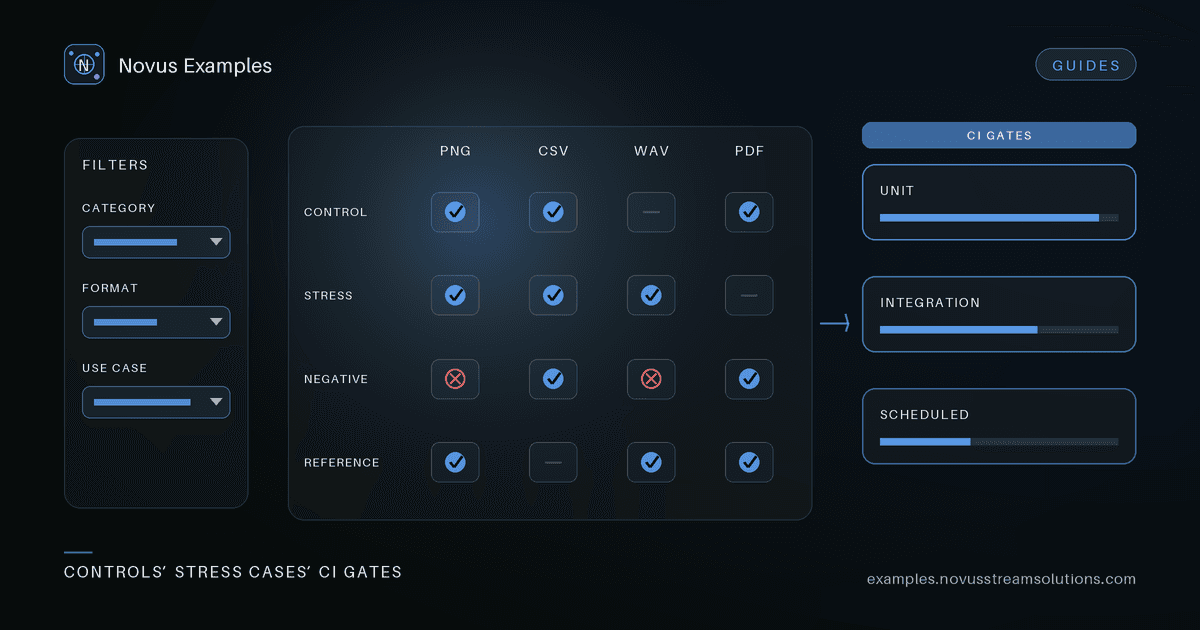
A useful matrix is not a pile of difficult files. It needs at least one boring control. Without that row, a failure on a hard case cannot tell you whether the feature is generally broken or only fails at the boundary.
For each behaviour, choose:
- A control that should pass without special handling.
- A targeted stress case that changes one meaningful property.
- A negative case when failure handling is part of the contract.
- A reference twin when output quality can be scored against known pixels, samples, text, or structure.
The paired-fixture pattern is especially useful for image restoration, denoise, colourization, audio trimming, OCR, and format conversion. The input and reference describe the same underlying content, so a metric is measuring the operation rather than two unrelated files. The visual-diff guide shows the same principle for subtle pixel changes.
Open each file page and copy the properties your assertion actually depends on. That might be width and height, channel count, codec, sample rate, silence timestamps, table dimensions, encoding, field names, or the expected failure mode. Do not copy every field just because it is present; a test becomes brittle when it asserts facts unrelated to the behaviour under test.
A compact row can look like this:
| Behaviour | Fixture role | Assertion |
|---|---|---|
| Decode a normal input | control | opens; dimensions match the spec |
| Honour orientation | stress | displayed pixels have the expected orientation |
| Handle truncation | negative | returns a typed error; process stays alive |
| Preserve appearance | reference pair | output stays under the agreed pixel-diff threshold |
Keep the Novus page URL beside the local filename in your test data or README. The page documents why the row exists, while the direct download gives automation a stable input. If a teammate replaces the file later, they can compare the replacement against the original spec instead of reverse-engineering your intent.
Run the smallest controls in unit tests, where a parser or transformer can be exercised directly. Put realistic containers and multi-part files in integration tests. Reserve expensive ladders—many resolutions, codecs, noise levels, or model inputs—for scheduled or release-gate runs.
This split keeps ordinary CI fast without deleting coverage. A failure also becomes easier to locate: control rows reveal general regressions, stress rows reveal boundary handling, and reference rows reveal quality drift.
Because the fixtures are generated and free for any use, you can commit a selected subset to a repository, cache it in CI, or fetch it during a test job according to your own dependency policy. The important part is to pin the exact file, not to re-run a vague web search whenever the suite is rebuilt.
- Write three to five behaviours your pipeline promises.
- Find a control and one focused stress case for each in Browse.
- Add a negative case only where your product promises graceful failure.
- Copy the relevant spec values and source-page URL into a small table.
- Assign each row to unit, integration, or scheduled CI.
- Run the control first, then the stress case, then score any paired output.
The result is deliberately small. Coverage comes from choosing independent failure modes, not from collecting hundreds of files. Start with the tutorial if you want a quick tour, or read the documentation for how specs, groups, and pairs are represented across the library.
Continue this workflow
Was this article helpful?
Found an error? Send a correction.