
Skip to content
Novus Examples

Professional Services · Synthetic business data

Tern Client Services

A linked company/contact/deal/activity pipeline with stage probabilities and a contact-import profile.

ZIP with instructions and SHA-256 checksums. Files stay in your browser.

Create from this data

Choose a starting template, then follow its table and field mapping. Studio imports add a table to your project; they do not automatically replace the template’s sample content.

Guided source import

Inspect and edit the source data

Source table: deals in the linked operating model.

deal_id
deal_id
stage
stage
amount
amount
probability
probability
weighted_amount
weighted_amount
  1. Open the linked operating model in the text and data editor. Find tables.deals.rows to inspect the records and exact field names.
  2. Keep identifiers as quoted text, retain the other tables and compare edits with the linked schema and expected results. Save a local copy before changing records.
Guided source import

Opportunity review

Source table: deals in the linked operating model.

deal_id
deal_id
stage
stage
amount
amount
probability
probability
weighted_amount
weighted_amount
  1. Download operating-model.json, then open this Document Studio template. Choose Import business data, select the JSON file, choose deals in Business data table and click Use table.
  2. The import appends a new typed table with all source columns. Use the listed fields for your report, edit its heading and remove unrelated sample blocks. Transfer any values needed by the original template into its fields explicitly; imported records do not replace or bind its sample line items.
  3. Save editable source to preserve the document project. Use the kit workbook in a spreadsheet application when you need its existing formulas, worksheets and chart layout.

Starts with this kit’s data

Opportunity one-pager

Source table: deals in the linked operating model.

stage
Label
amount
Value
  1. This visual starts from Tern Client Services data. Open the template and select its business-chart layer to edit the existing data-driven composition.
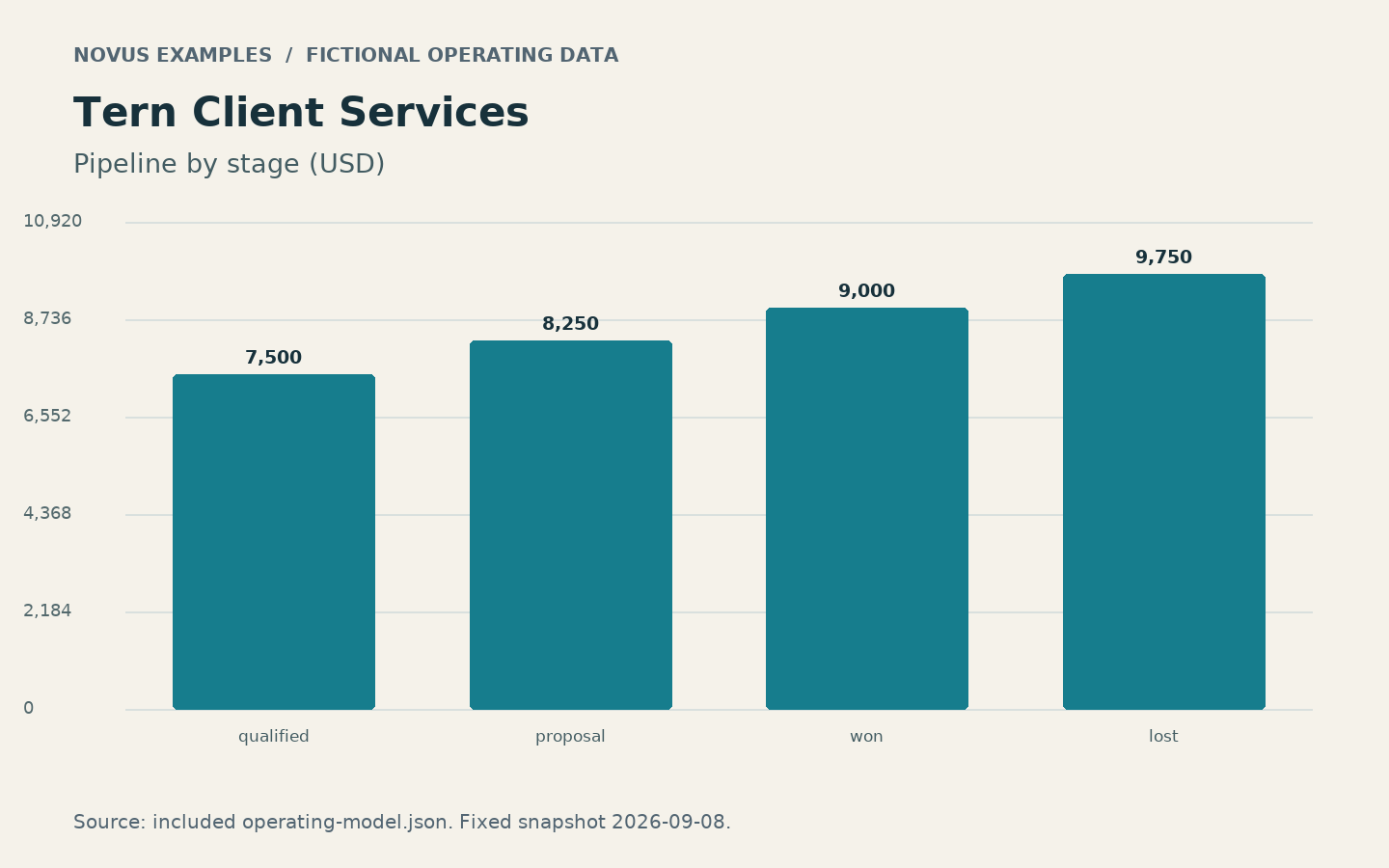
  2. The chart groups deals by stage and sums amount in USD. Update Label and Value with those grouped totals; the three headline KPI text fields are snapshot values and need separate edits when the source changes.
  3. To inspect a changed source file inside Visual Studio, choose Import business data, select operating-model.json, choose deals and click Use table. This adds a separate table layer. It does not overwrite the composed menu or chart; transfer the listed fields to that layer explicitly and remove the temporary imported layer when finished.

Starts with this kit’s data

Opportunity report cover

Source table: deals in the linked operating model.

stage
Label
amount
Value
  1. This visual starts from Tern Client Services data. Open the template and select its business-chart layer to edit the existing data-driven composition.
  2. The chart groups deals by stage and sums amount in USD. Update Label and Value with those grouped totals; the three headline KPI text fields are snapshot values and need separate edits when the source changes.
  3. To inspect a changed source file inside Visual Studio, choose Import business data, select operating-model.json, choose deals and click Use table. This adds a separate table layer. It does not overwrite the composed menu or chart; transfer the listed fields to that layer explicitly and remove the temporary imported layer when finished.

Starts with this kit’s data

Opportunity case study

Source table: deals in the linked operating model.

stage
Label
amount
Value
  1. This visual starts from Tern Client Services data. Open the template and select its business-chart layer to edit the existing data-driven composition.
  2. The chart groups deals by stage and sums amount in USD. Update Label and Value with those grouped totals; the three headline KPI text fields are snapshot values and need separate edits when the source changes.
  3. To inspect a changed source file inside Visual Studio, choose Import business data, select operating-model.json, choose deals and click Use table. This adds a separate table layer. It does not overwrite the composed menu or chart; transfer the listed fields to that layer explicitly and remove the temporary imported layer when finished.

Start with blank input tables

The ZIP contains a header-only CSV for every source table. Fill the fields using the kit schema, then open the CSV in the text and data editor or import it into a Studio. Open the completed operating workbook in a spreadsheet application to retain its native worksheets, formulas and chart layout.

Download blank CSV templates

Start with the expected results

Read the kit guide, follow each input’s import order, then compare your output with the reconciliation checks. Planning datasets do not imply that a platform can import them.

Platform compatibility

Example data

Generic business records

Profile 2026-09-08.1 · reviewed 2026-09-08

  1. Map fields to your application schema and retain stable relationships.

Generic records are not native imports for unnamed platforms.

Specification validated

HubSpot contacts

Profile 2026-09-08.1 · reviewed 2026-09-08 · US

  1. Review the separate profile schema and current vendor mapping screen.

This profile creates contact records only. It does not import associations or marketing consent.

No completed platform-account import is claimed.

Evidence: Official documentation and strict local schema checks

Inputs, templates and references

Input · 23.7 KB · Valid

98 records across 9 linked tables; no duplicate primary keys or missing references. Total deal value=34,500.00 USD; Weighted deal value=15,825.00 USD; Recorded activity time=720.00 minutes.

Schema · 21.6 KB · Reference

Draft 2020-12 schema accepts the paired operating model. Relational rules additionally require unique keys and existing foreign references.

Expected Results · 2 KB · Reference

Exact table counts, metric formulas, 4 chart points and three negative-test outcomes. Total deal value=34,500.00 USD; Weighted deal value=15,825.00 USD; Recorded activity time=720.00 minutes.

Reference · 55 KB · Valid

Three readable pages summarize the same model, chart, source tables and usage instructions. Total deal value=34,500.00 USD; Weighted deal value=15,825.00 USD; Recorded activity time=720.00 minutes.

Template · 24.2 KB · Valid

Native sheets preserve 98 source records, 3 calculated headline metrics and one editable chart. Total deal value=34,500.00 USD; Weighted deal value=15,825.00 USD; Recorded activity time=720.00 minutes.

Input · 295 B · Valid

8 unique records follow the documented Hubspot field subset. Strict local specification checks pass; account import and stored results are not verified.

Schema · 1 KB · Reference

8 unique records follow the documented Hubspot field subset. Strict local specification checks pass; account import and stored results are not verified.

Deliberately invalid tests