
Sitemap with the image extension
A sitemap using the image extension namespace: six images across three pages, with and without titles and captions, in JPEG, WebP and AVIF. For testing extension-namespace parsing and image-discovery pipelines.
<?xml version="1.0" encoding="UTF-8"?>
<urlset xmlns="http://www.sitemaps.org/schemas/sitemap/0.9"
        xmlns:image="http://www.google.com/schemas/sitemap-image/1.1">
  <url>
    <loc>https://www.example.com/catalog/boots</loc>
    <lastmod>2026-01-01</lastmod>
    <image:image>
      <image:loc>https://cdn.example.net/img/boots-front.jpg</image:loc>
      <image:title>Trail boot, front three-quarter view</image:title>
      <image:caption>Sample product photograph (fictional)</image:caption>
    </image:image>
    <image:image>
      <image:loc>https://cdn.example.net/img/boots-sole.jpg</image:loc>
      <image:title>Trail boot outsole</image:title>
    </image:image>
    <image:image>
      <image:loc>https://cdn.example.net/img/boots-detail.webp</image:loc>
    </image:image>
  </url>
  <url>
    <loc>https://www.example.com/catalog/gloves</loc>
    <image:image>
      <image:loc>https://cdn.example.net/img/gloves-pair.jpg</image:loc>
      <image:caption>Sample product photograph (fictional)</image:caption>
    </image:image>
  </url>
  <url>
    <loc>https://www.example.com/lookbook</loc>
    <image:image>
      <image:loc>https://cdn.example.net/img/lookbook-01.avif</image:loc>
    </image:image>
    <image:image>
      <image:loc>https://cdn.example.net/img/lookbook-02.avif</image:loc>
    </image:image>
  </url>
</urlset>
Specifications
- Seed
- 70400
- Site
- example.com (fictional)
- Format
- urlset + image 1.1
- Urls
- 3
- Images
- 6
- Child Elements
- loc, title, caption
Testing contract
Expected to pass- Scenario
- Extract every image URL and its optional metadata.
- Expected result
- Six image:loc values are returned grouped under their three parent pages; the two images with no title or caption parse cleanly, and the image namespace is resolved by URI, not by prefix.
What is a .xml file?
XML (Extensible Markup Language) is a verbose, self-describing markup language using nested tags, attributes, and namespaces to represent structured, hierarchical data. It supports schemas, entities, and validation and underlies many document and data formats. It remains common in enterprise, publishing, and interchange contexts.
How to use this file
Use an example XML file to test parsers, namespace and schema validation, XPath queries, and protection against entity-expansion and external-entity attacks.
How to use this file for testing
“Sitemap with the image extension” is a deterministic Novus Examples fixture for Web assets, Web scraping, Editor testing. Favicons, web app manifests, service workers, robots and sitemap files, Open Graph images, and .well-known resources — for testing web tooling, crawlers, PWA installers, and asset pipelines.
Documented properties for this file: seed 70400 · urlset + image 1.1. Compare results against paired or grouped companions on this page when present (clean↔damaged, searchable↔scanned, or format twins) so scores stay reproducible across runs.
Download the file once, keep the path stable in CI or local scripts, and treat the spec table as the contract: dimensions, seeds, field lists, and roles are intentional. Corrupt or invalid samples are labelled as such — expect parsers to fail loudly rather than silently accept them.
Web-platform fixtures are standards-compliant samples against fictional example.com data. Test crawlers, PWA installers and manifest validators, favicon/icon pipelines, service-worker registration, or .well-known parsers against the documented structure.
Code examples
import xml.etree.ElementTree as ET

tree = ET.parse("sitemap-images.xml")
root = tree.getroot()
print(root.tag, [c.tag for c in root][:5])
Related files
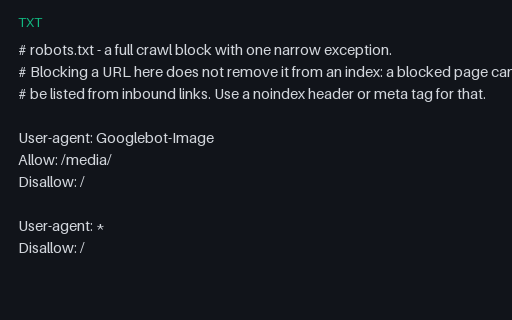
- txtrobots.txt - block everything except one pathA robots.txt that disallows the entire site for every crawler while allowing one media path for a single image agent. For testing full-block handling and the common misconception that a Disallow removes a URL from a search index.
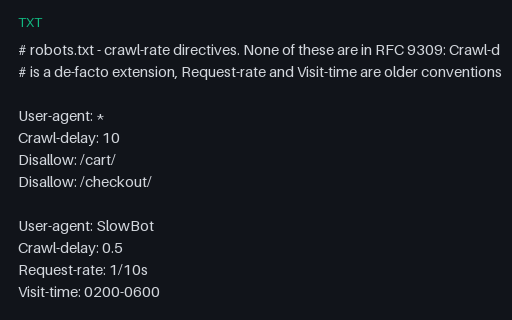
- txtrobots.txt - Crawl-delay, Request-rate and Visit-timeA robots.txt carrying three different crawl-rate hints - an integer Crawl-delay, a fractional one alongside Request-rate and Visit-time, and a very large one - none of which are part of RFC 9309. For testing that a crawler reads or ignores rate hints without dropping the Disallow rules that share the group.
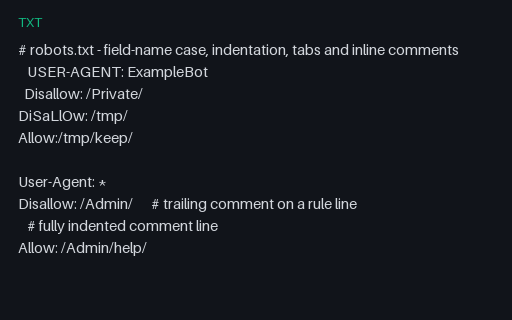
- txtrobots.txt - field case, tabs and indentationA robots.txt using upper-case, mixed-case and indented field names, a tab-indented rule, a value with no space after the colon, and both trailing and full-line comments. For testing that field names are treated case-insensitively while path values stay case-sensitive.
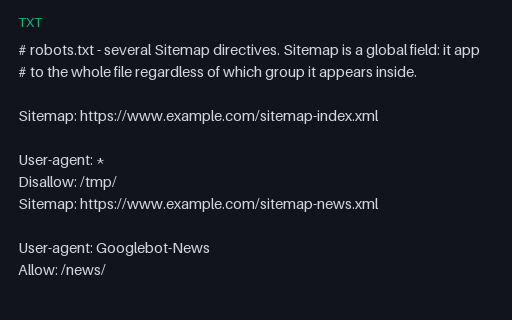
- txtrobots.txt - five Sitemap directivesA robots.txt declaring five sitemaps - before the first group, inside two different groups, in lower case, gzipped, and on another host. For testing that a discovery crawler collects Sitemap as a file-global field instead of scoping it to the group it sits in.
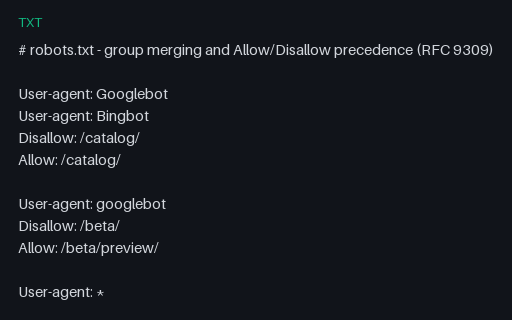
- txtrobots.txt - merged groups and Allow/Disallow precedenceA robots.txt where Googlebot is named by two separate groups and every Disallow has an equal-length Allow competing with it. For testing group merging, case-insensitive product tokens, and the rule that the most specific match wins with Allow breaking ties.
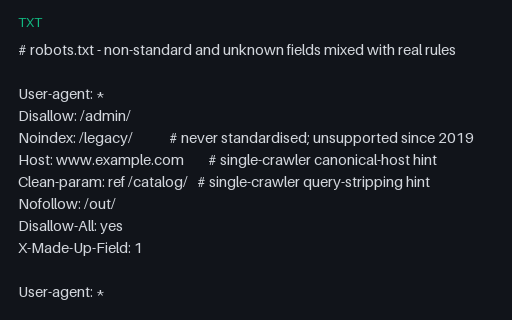
- txtrobots.txt - unknown and vendor-specific fieldsA robots.txt in which real Disallow rules are surrounded by Noindex, Host, Clean-param, Nofollow and two invented fields, several with inline comments. For testing that a parser skips fields it does not implement instead of aborting or mis-binding the rules that follow.
Generated by generation/web_p7.py. Free for any use, no attribution required — license.