
Interlaboratory Comparison — z-Scores and En Numbers (.csv)
Six fictional laboratories reporting the same measurand, scored both by z-score against a fixed sigma and by En number against each lab's own claimed uncertainty. The two statistics disagree about which labs are acceptable, which is the point: En rewards an honest uncertainty claim and z does not.
lab_id,result_mol_L,u_lab_mol_L,assigned_value_mol_L,u_assigned_mol_L,z_score,En_number,verdict
LAB-A,0.101480,0.000310,0.10150,0.00025,-0.057,-0.050,satisfactory
LAB-B,0.101620,0.000280,0.10150,0.00025,+0.343,+0.320,satisfactory
LAB-C,0.101010,0.000260,0.10150,0.00025,-1.400,-1.358,satisfactory
LAB-D,0.101530,0.000450,0.10150,0.00025,+0.086,+0.058,satisfactory
LAB-E,0.102310,0.000300,0.10150,0.00025,+2.314,+2.074,questionable
LAB-F,0.101495,0.000210,0.10150,0.00025,-0.014,-0.015,satisfactory
Specifications
- Labs
- 6
- Columns
- 8
- Assigned Value
- 0.1015
- U Assigned
- 0.00025
- Sigma For Z
- 0.00035
- Z Rule
- |z| <= 2 satisfactory, <= 3 questionable
- En Rule
- |En| <= 1 is consistent with the claimed uncertainty
- Questionable By Z
- 1
- Failing En
- 2
- Labs Where The Two Disagree
- 1
- Synthetic Lab Ids
- true
Testing contract
Reference control- Scenario
- Recompute z and En for every laboratory from the result, uncertainty and assigned-value columns.
- Expected result
- Your z and En values match to three decimals, LAB-E is questionable by z-score and also fails En, and LAB-C is satisfactory by z-score while its En of -1.358 fails the consistency criterion.
What is a .csv file?
CSV (Comma-Separated Values) is a plain-text tabular format where rows are lines and fields are separated by commas, with quoting rules for values that contain delimiters, quotes, or newlines. It has no formal type system and depends on encoding and dialect conventions. It is the most portable format for tabular data exchange.
How to use this file
Use an example CSV to test parsers against quoting and embedded-delimiter edge cases, header handling, encoding detection, and import pipelines into databases or spreadsheets.
How to use this file for testing
“Interlaboratory Comparison — z-Scores and En Numbers (.csv)” is a deterministic Novus Examples fixture for Scientific data, CSV parsing, Editor testing. Citation catalogs (BibTeX, RIS), chemistry structures (MDL Molfile, PDB), and gridded binary data (NetCDF, FITS) — for testing reference managers, molecule viewers, and scientific-data loaders.
Documented properties for this file: 8 columns. Compare results against paired or grouped companions on this page when present (clean↔damaged, searchable↔scanned, or format twins) so scores stay reproducible across runs.
Download the file once, keep the path stable in CI or local scripts, and treat the spec table as the contract: dimensions, seeds, field lists, and roles are intentional. Corrupt or invalid samples are labelled as such — expect parsers to fail loudly rather than silently accept them.
Scientific fixtures are small, valid, and fully synthetic — no real organism, patient, sample, or observation. Point your parser or loader at the file and check it reads the documented records, variables, or headers; binary formats ship a readable twin or metadata listing for comparison.
Code examples
import pandas as pd

df = pd.read_csv("interlaboratory-comparison.csv")
print(df.head())
print(df.dtypes)
Related files
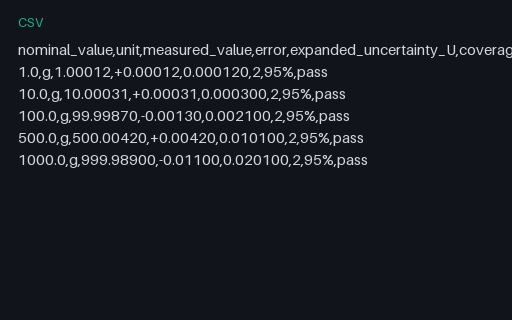
- csvCalibration Certificate — Error and Expanded Uncertainty (.csv)Five calibration points with the nominal value, the measured value, the signed error and the expanded uncertainty at k=2 with its confidence level stated. It is a synthetic illustration of the layout, not an accredited certificate, and nothing in it refers to a real instrument or laboratory.
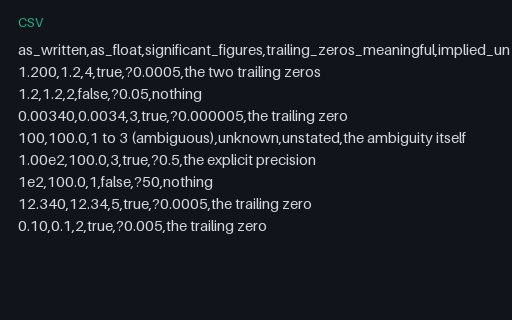
- csvSignificant Figures Lost to Float Parsing (.csv)Eight written measurements where the trailing zeros carry the precision of the measurement, alongside what a float parse leaves behind. Parsing 1.200 to the double 1.2 is not a rounding error, it is the loss of the claim that the value is known to four figures.
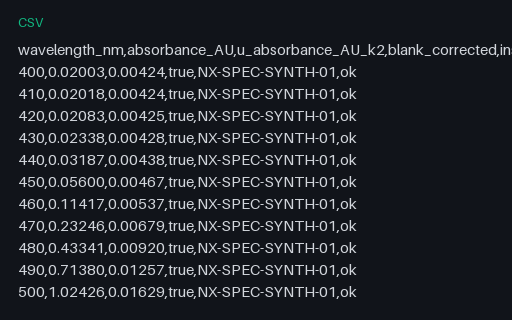
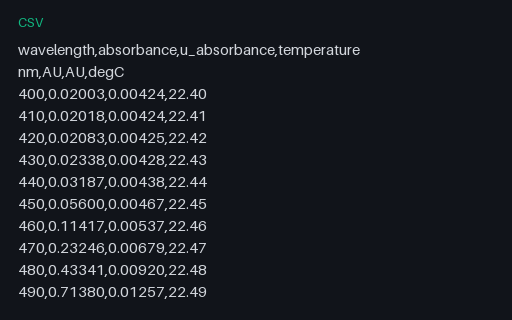
- csvSpectrometer Absorbance With Expanded Uncertainty (.csv)A synthetic absorbance scan from 400 to 630 nm with a Gaussian band at 520 nm, carrying its expanded uncertainty at k=2 in a dedicated column and a per-row quality flag. The unit and the coverage factor live in the column names, which is the convention most instrument exports actually use.
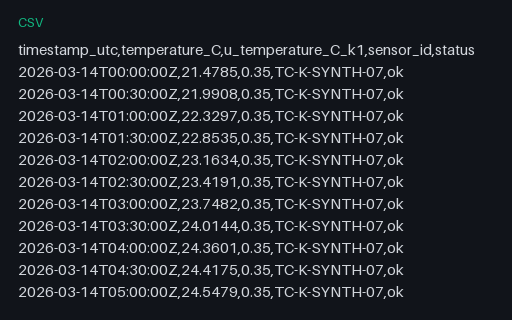
- csvThermocouple Time Series With Standard Uncertainty (.csv)A full day of thermocouple readings at 30-minute cadence with a constant type-B standard uncertainty and two rows flagged as recovering. The timestamps are explicit UTC with a Z suffix so a reader has no excuse to guess a timezone.
- csvUnits on a Second Header Row — Not Data (.csv)The same instrument export with units on a second header row instead of inside the column names, which is how a great many laboratory instruments write CSV. An importer that treats row two as data types every measurement column as text and then quietly refuses to plot anything.
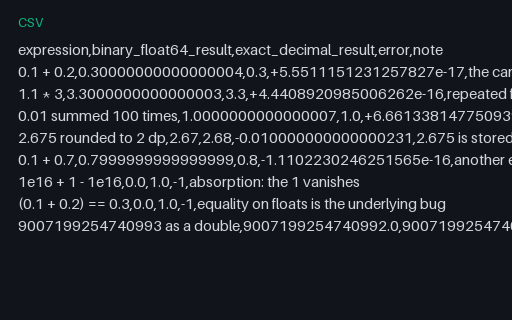
- csvBinary versus Decimal Arithmetic — Where Floats Disagree (.csv)Eight arithmetic expressions where binary floating point and exact decimal disagree, with both answers and the signed error side by side. Adding one cent a hundred times does not give one, and this file says by exactly how much.
Generated by generation/scientific.py. Free for any use, no attribution required — license.