
How to test watermark removal with synthetic SAMPLE marks
Score watermark removers using clean references, synthetic SAMPLE overlays, and masks, without real brand logos.
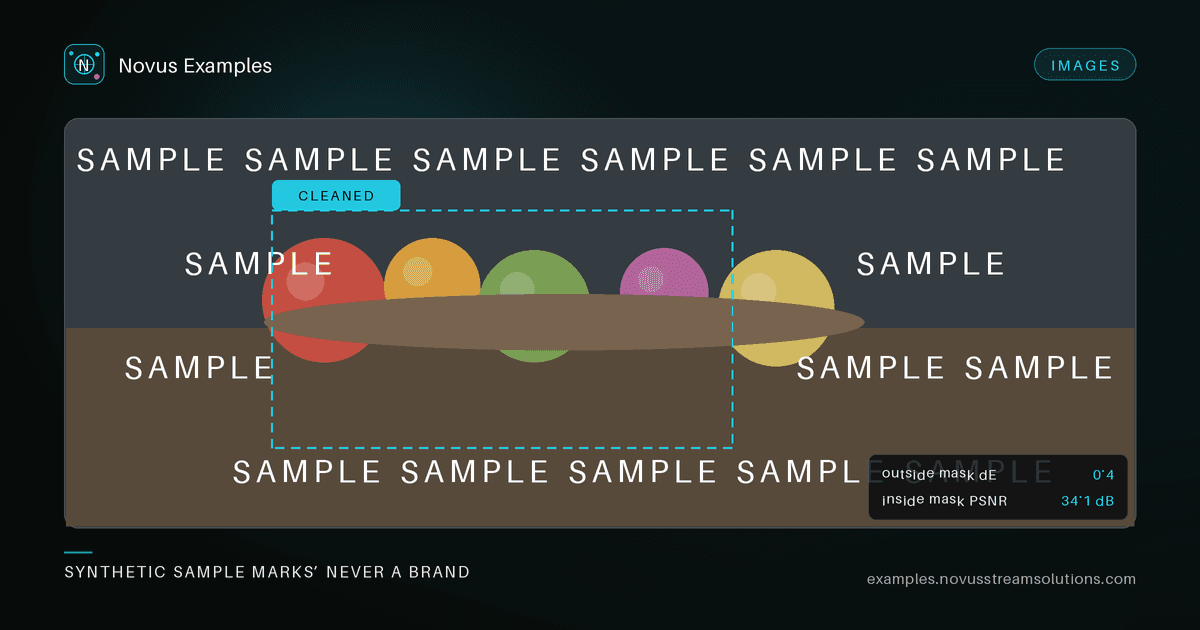
Watermark removers are easy to demo and hard to measure. Random stock photos with real logos create legal and reproducibility problems. Novus ships synthetic SAMPLE marks on deterministic scenes so you can score tools safely.
Browse the watermark-removal purpose or Browse → watermark-set. Each case includes:
- A clean reference (fruit still life, no mark)
- A marked input (corner logo, centre text, tiled, translucent wash, or diagonal banner)
- A mask of the mark region
Every overlay uses the word SAMPLE: never a third-party brand mark.
- Run the remover on the marked input (optionally conditioned on the mask).
- Compare output to the clean reference.
- Check that non-marked regions stay stable (no global blur or colour shift).
Step 3 is the one people skip, and it is the one that catches the most failures. A single whole-image PSNR blends two questions that have different answers, so split it using the supplied mask:
- Inside the mark region: did it actually reconstruct the underlying image? PSNR here is the interesting number, and it will be far lower than the whole-image figure because this is the only genuinely hard part.
- Outside the mark region: did it leave everything else alone? This should be near-perfect. Anything below roughly 45 dB PSNR outside the mask means the tool re-encoded, re-toned, or blurred the whole image on its way past.
The outside-mask score is the honest test of a "removal" tool, and a lot of them fail it. Global denoise or a decode/re-encode round trip will happily raise your whole-image average while quietly degrading every pixel that never needed touching. Assert a hard floor on the outside-mask metric and treat any regression there as a failure even when the mark itself came out cleanly.
The five overlay styles are not variations for their own sake. Each breaks a different assumption:
- Corner logo is the easy case, and a useful control. If a tool fails here it is broken, not merely limited.
- Centre text sits over the subject rather than background, so there is no nearby matching texture to clone from. Tools that work by patch-matching degrade visibly here.
- Tiled covers so much of the frame that there is little clean area left to infer from, and it exposes tools that process a single bounding box rather than a disjoint mask.
- Translucent wash is the one that separates real inverse-compositing from inpainting. The pixels underneath are still partly present, so a tool that simply paints over the region throws away recoverable detail, and will score worse than doing nothing on a light wash.
- Diagonal banner crosses many edges at an angle, which is where structure propagation either works or produces the smeared, wavy artefacts that give inpainting away.
Run all five and score them separately. A single averaged number hides the fact that a tool is excellent at corners and useless on a wash.
Using real branded stock imagery for this would create two problems and solve none. The legal one is obvious. The reproducibility one matters more for testing: stock licences change, images get pulled, and a suite pinned to third-party URLs rots. A synthetic mark on a deterministic scene stays byte-identical for as long as the fixture exists, so a score from last year is comparable to one from today.
The honest trade-off: a real logo has soft anti-aliased edges, a drop shadow, and sometimes partial transparency baked over JPEG artefacts. A synthetic SAMPLE overlay is cleaner than that. Treat these fixtures as the lower bound on difficulty: a tool that fails here will certainly fail on real marks, but passing here is not proof it handles production imagery. Use them the way you would a unit test: to catch regressions quickly and cheaply, with a smaller manual pass on realistic inputs before you ship.
- Inpainting cuts when the task is fill-a-hole rather than remove-a-mark
- Object removal style hard edges when compositing after removal
- JPEG artefacts when compression rings interact with marks
Continue this workflow
Was this article helpful?
Found an error? Send a correction.