
Test Archive Extraction With Real Compression Fixtures
Extractors fail on codecs they never linked, filenames they cannot decode, and nesting they never expected. Here is how to find out before your users do.
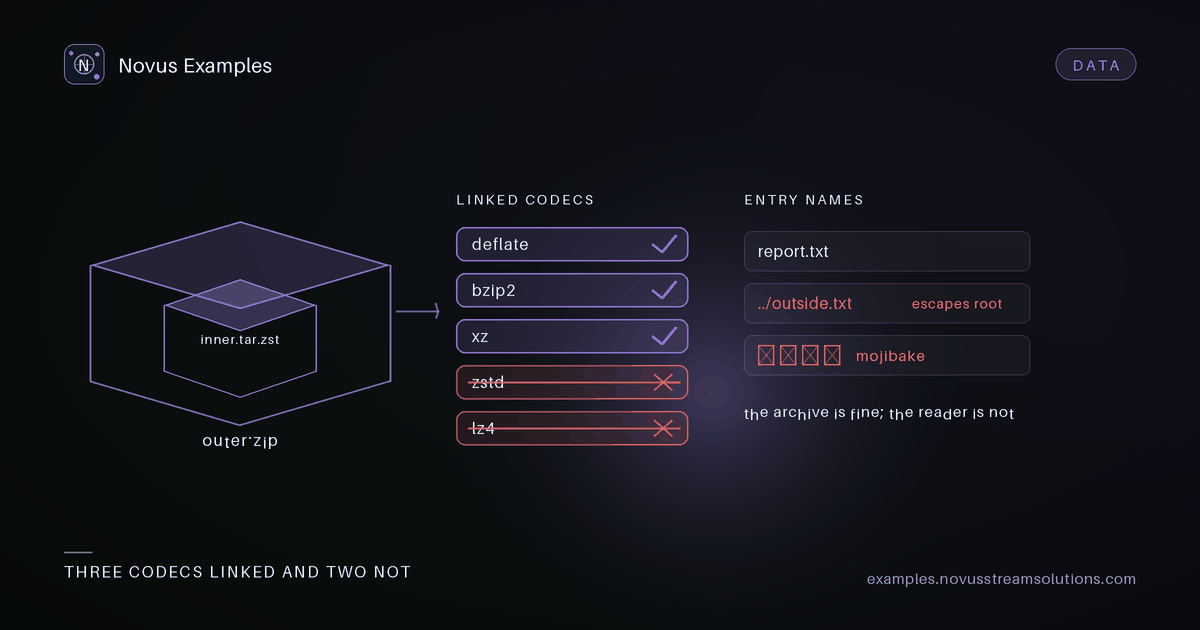
The zip you make to test with is the easiest zip that will ever reach your code. One directory, ASCII filenames, deflate, a few kilobytes. Every library opens it. The archives that break extractors in production are the ones nobody thinks to create, and they break in ways that do not look like archive bugs at all: a missing file, a mangled name, a silent truncation, a process that exits zero having written nothing.
The archive catalogue here is 131 fixtures precisely because the failures cluster in places a hand-made sample never reaches.
This is the failure that costs the most time, because the error message is usually about something else entirely.
Compression formats are not one capability. A libarchive build links a set of codecs, and which
set depends on how it was compiled. Builds compiled for the browser are routinely smaller than the
system build a developer tests against locally, and zstandard and lz4 are the two most commonly
absent. The same call that extracts a .tar.gz on your laptop can return an empty result for a
.tar.zst in a WebAssembly build, without raising anything you would recognise as
"unsupported codec".
Two fixtures exist for exactly this: zstandard-single-file and lz4-single-file. They are
single-member streams, small and boring on purpose, so that when extraction fails the only variable
is the codec. If your pipeline handles gzip, bzip2 and xz and then returns nothing for these two,
you have found a link-time gap and not a logic bug.
Test the older single-member streams alongside them, compressed-single-gz, compressed-single-bz2
and compressed-single-xz, so you can tell "this codec is missing" from "single-member streams are
mishandled generally". Those are different repairs.
zip-unicode-names exists because the zip format spent decades ambiguous about filename encoding.
A zip entry carries a flag bit that says the name is UTF-8. When that bit is clear, the name is
conventionally CP437, and readers that assume UTF-8 regardless will produce mojibake for anything
outside ASCII. Readers that assume CP437 regardless will mangle correctly flagged UTF-8 names.
The user-visible symptom is not an error. It is a file on disk with a wrong name, which then fails a later lookup that had nothing to do with the archive. If your extractor writes to disk, this fixture is also the one that tells you whether your path sanitiser survives characters it did not expect.
Three fixtures vary the structure rather than the bytes:
zip-flatis the control. One level, nothing surprising.zip-deep-treenests far enough to find path-length limits, which on Windows arrive earlier than most developers expect and surface as a permission error rather than a length error.zip-many-fileshas enough entries to make per-entry overhead visible, and to cross the threshold where a reader must handle the zip64 central directory rather than the classic one.
zip-empty deserves its own mention. An archive with no entries is valid, and a surprising number
of extractors treat "no entries" as "failed to read". If your code reports an error for this one,
your users will see an error every time someone uploads an empty export.
nested-zip-sample and deep-nested-zip-sample are archives inside archives. Recursive extraction
is a reasonable feature and an unbounded one is a denial-of-service surface, so the question these
fixtures answer is not "can you recurse" but "where do you stop, and do you say so".
A good result is a stated depth limit and a clear message. A bad result is either silent truncation that looks like a successful extraction, or recursion that continues until memory runs out.
There is no zip bomb in this catalogue and there never will be. The nesting fixtures are ordinary archives at ordinary sizes; they test control flow, not resource exhaustion.
An extractor that only handles zip and tar meets these eventually:
sevenzip-archiveandsevenzip-password-protected. The second matters because an encrypted entry should be reported as needing a password, not as corrupt. Those are very different messages to show a user.cpio-newc-archiveandunix-ar-archive, which appear inside package formats and initramfs images far more often than people expect.iso-9660-disk-image, where the archive is a filesystem image and the extraction question is whether you read the directory structure or hand back one large opaque blob.warc-web-archiveandwarc-multi-record-sample, the web-crawl format, where one file holds many request and response records with their own headers.
The GDPR export fixtures are the closest thing here to a real archive a real user will hand you:
gdpr-sample-export-zip, gdpr-json-only-export-zip, gdpr-csv-heavy-export-zip and
gdpr-nested-export-zip, plus the loose members they contain as separate files
(gdpr-messages-json, gdpr-activity-jsonl, gdpr-devices-csv, gdpr-preferences-toml).
They matter because a data export is an archive whose contents are heterogeneous by definition: JSON, JSONL, CSV and TOML in one bundle, at wildly different sizes. If your importer assumes one format per archive, or streams the whole thing into memory before looking at it, this is where you find out.
Having the members available individually is deliberate. When an import of the bundle fails, you want to know whether the archive layer or the parser broke, and testing the member on its own answers that in one step.
- Start with
zip-flatandzip-empty. If either fails, nothing after it is meaningful. - Add
zstandard-single-fileandlz4-single-fileearly. A codec gap explains failures you would otherwise spend hours attributing to your own code. - Then
zip-unicode-names, because a wrong filename is a silent failure and silent failures are the expensive ones. - Then shape:
zip-deep-tree,zip-many-files. - Then the non-zip formats you actually expect to receive, rather than all of them.
- Finish with a GDPR export, because it is the only one shaped like the real thing.
Every fixture above is downloadable on its own page, with the specification it was generated from and the bytes pinned by checksum, so a failure you find today reproduces tomorrow.
Continue this workflow
Documentation and troubleshooting
Was this article helpful?
Found an error? Send a correction.