
From Download to Local Editor: Building Reliable Form and Document Test Contracts
Use linked HTML, AcroForm, JSON, CSV, DOCX, XLSX, PDF, and Markdown artifacts to test field parity, local editing, export, and document workflows.
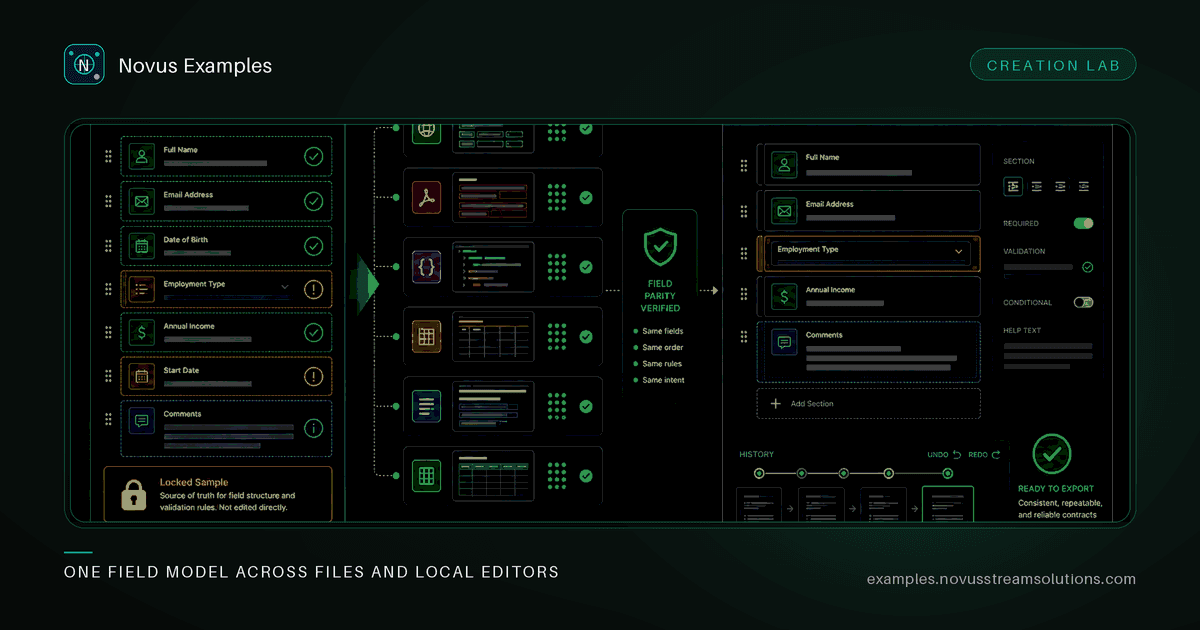
A form demo can look convincing while its JSON export uses different field names. A fillable PDF can paint every label correctly while exposing incomplete widget names. A document template can open in an editor but lose a table, formula, or heading when exported.
Those are contract failures, not cosmetic differences. The artifact, the editable definition, and the expected output must describe the same workflow.
Novus Examples now publishes linked form and document families built from one source model. Each new page includes a visible Testing contract with the scenario, expected result, and validity role. The files stay local: downloads are static, and Form Studio and Document Studio perform their editing and export work in the browser.
Start by naming the task the fixture represents. “A form with twelve fields” is not a use case. “An L1 agent escalates a case with customer impact, troubleshooting history, and the requested next action” is.
The form expansion covers eight permanent workflows: bug reporting, accessibility issue reporting, support escalation, product return authorization, expense reimbursement, vendor onboarding, volunteer applications, and service quote requests. Each one has fields and constraints chosen for that job.
The document expansion adds client onboarding, incident postmortems, campaign content briefs, project risk registers, event run-of-show sheets, and vendor evaluation scorecards. Their headings, tables, formulas, and sample values are part of the contract rather than filler added after the layout was designed.
Real use cases improve tests because a mismatch has a consequence. If an RMA export drops the SKU, it cannot identify the returned item. If a risk register flattens probability and impact into one column, its score cannot be checked. If an incident postmortem loses the timeline, the document no longer supports the review it was made for.
Every new form family ships exactly five linked entries:
- an editable HTML form;
- a fillable AcroForm PDF;
- a JSON field manifest;
- a JSON sample response;
- a CSV sample export.
The HTML is the interaction surface. The AcroForm tests PDF field discovery and filling. The manifest is the machine-readable definition. The sample response supplies a known submission. The CSV tests a common downstream tabular export.
A PDF parser test does not need to download HTML first. Each independently useful artifact still has its own permanent detail page.
The generator-level definition drives field IDs, labels, types, options, required states, and sample values. Form Studio definitions are derived from the shipped HTML and checked by hash. That removes a dangerous manual step: maintaining an editor template that merely resembles the download.
Create a normalized field record for each format. A useful record contains:
{
  "id": "severity",
  "label": "Severity",
  "type": "select",
  "required": true,
  "options": ["Low", "Medium", "High", "Critical"],
  "sampleValue": "High"
}
Extract the same shape from the HTML controls, AcroForm field tree, JSON manifest, response, and CSV header. Then compare IDs and order first; compare types, required states, options, and values second.
Do not compare only the number of fields. Two collections can have the same length while a label targets the wrong control or a PDF widget uses an unrelated name. For PDF, inspect the logical AcroForm field tree and its widgets, not just page text. A painted label is not a fillable field, and an appearance stream is not proof that the stored value is correct.
The linked HTML twin on each supported AcroForm page opens the exact definition in Form Studio. Five older specialty PDFs remain on an explicit no-twin allowlist; the site does not claim parity where a faithful browser-editable equivalent does not exist.
Opening the exact form is only the start. A useful editor must let a tester create controlled variations without rebuilding the fixture.
Form Studio keeps a sixty-step undo and redo history. You can duplicate a field, change required state or options, reorder it with accessible drag controls, use arrow buttons from the keyboard, and move it between sections. Locked SAMPLE notices remain in protected fixture definitions so an illustrative form cannot be mistaken for a production or official document.
Turn those features into interaction tests:
- Open the form from its file page and assert the initial field sequence.
- Duplicate one field and verify that its new ID is unique.
- Move it within the section, then into another section.
- Undo each change and confirm the original definition returns.
- Redo the sequence and export.
- Parse the export and compare it with the visible editor state.
Test the keyboard path separately from pointer drag. The arrow controls are not a fallback to ignore; they are the deterministic path for accessibility checks and often the least flaky choice in browser automation.
The six new document families each originate from one content model and ship in three formats. Narrative families use DOCX, PDF, and Markdown. Table-led operational families use XLSX, PDF, and CSV.
Normalize the concepts that should survive format changes. For a postmortem, compare the title, summary, impact, timeline rows, contributing factors, actions, owners, and due dates. For a risk register, compare row identifiers, probability, impact, calculated score, mitigation, and owner. Layout can differ; meaning should not.
Document Studio now opens the new families and twelve existing ones without adding duplicate downloads. It supports browser-local DOCX and XLSX generation, plus CSV export only when a definition contains exactly one table. That rule is intentionally narrow. Flattening two unrelated tables into one CSV would create an ambiguous artifact and a false promise of parity.
When testing spreadsheets, inspect formulas as formulas and values as values. A rendered PDF can prove what a user sees, but it cannot prove the XLSX still contains the risk-score expression. Conversely, a workbook parser cannot prove the PDF kept its headings and page-readable table.
A complete regression follows the user's route rather than testing isolated functions:
- Find the family through search, a purpose page, or the forms/templates hub.
- Open the detail page and read the published contract.
- Download one artifact and verify its MIME type, filename, and local bytes.
- Follow the exact Studio link rather than choosing a generic starter.
- Confirm fields, headings, tables, formulas, and SAMPLE markings.
- Make one controlled edit, undo it, redo it, and export.
- Parse the export and compare it with the edited definition.
- Open the related family files and verify cross-format meaning.
This sequence also checks the catalog's supporting features: canonical detail URLs, one primary download action, preview coverage, group links, sharing metadata, and related-file discovery. A fixture that exists on disk but cannot be found or understood through the app is only partially implemented.
The Studios are local editors. They do not create accounts, store customer submissions, import arbitrary HTML, or upload documents to a backend. That boundary is valuable in testing: fixture state is disposable, sensitive production data is unnecessary, and the export is the artifact under review.
Use fictional sample values, especially for vendor, expense, volunteer, support, and booking-like workflows. Keep locked notices on anything that could be mistaken for an official record. If a future workflow needs shared storage, authentication, or server-side processing, treat it as a separate architecture decision instead of hiding it inside a static example library.
The practical goal is not maximum format count. It is a chain of evidence: one use case, one source model, matching downloads, an exact local editor, a controlled mutation, and a parseable export. When every link agrees, the example becomes a dependable test contract rather than a nice-looking template.
Continue this workflow
Was this article helpful?
Found an error? Send a correction.