
Fieldnote Learning Centre: Enrolment export
Enrolment export for Fieldnote Learning Centre. 18 enrolments over 3 courses and 12 learners, 6 per course. 15 are complete and 9 passed. passed is true only where the enrolment is complete and the score reaches the pass score, which is why 2 rows carry a score at or above 70 and passed false: ENR-17 at 75 and ENR-18 at 82.
csv
text/csv
- Document Set
- education
- Industry
- education
- Source Kit
- education-training
- Synthetic
- true
- As Of
- 2026-09-08
- Rows
- 18
Binary csv: no in-browser preview. Download it above to open in a compatible application.
Specifications
- Document Set
- education
- Industry
- education
- Source Kit
- education-training
- Synthetic
- true
- As Of
- 2026-09-08
- Rows
- 18
- Courses
- 3
- Learners
- 12
- Completed
- 15
- Passed
- 9
- High Scoring Incomplete
- 2
- Encoding
- UTF-8
Testing contract
Expected to pass- Scenario
- Import the export and derive the pass flag from score and completion.
- Expected result
- Deriving passed as completed AND score >= pass_score reproduces the column on all 18 rows, giving 9 passes. Deriving it from the score alone gives 11, which is the mistake the two high-scoring incomplete enrolments exist to catch.
What is a .csv file?
CSV (Comma-Separated Values) is a plain-text tabular format where rows are lines and fields are separated by commas, with quoting rules for values that contain delimiters, quotes, or newlines. It has no formal type system and depends on encoding and dialect conventions. It is the most portable format for tabular data exchange.
How to use this file
Use an example CSV to test parsers against quoting and embedded-delimiter edge cases, header handling, encoding detection, and import pipelines into databases or spreadsheets.
How to use this file for testing
“Fieldnote Learning Centre: Enrolment export” is a deterministic Novus Examples fixture for Data import. Realistic faker-generated datasets with documented schemas for testing import and ETL flows.
Documented properties for this file: 18 rows · UTF-8. Compare results against paired or grouped companions on this page when present (clean↔damaged, searchable↔scanned, or format twins) so scores stay reproducible across runs.
Download the file once, keep the path stable in CI or local scripts, and treat the spec table as the contract: dimensions, seeds, field lists, and roles are intentional. Corrupt or invalid samples are labelled as such, expect parsers to fail loudly rather than silently accept them.
Data fixtures document their exact quirks (delimiters, encodings, null handling, schema, and row counts) in the spec table. Point your parser or importer at the file and assert it handles the documented edge cases; clean and deliberately-messy siblings make before/after diffs straightforward.
Code examples
import pandas as pd

df = pd.read_csv("enrolment-export.csv")
print(df.head())
print(df.dtypes)
Related files
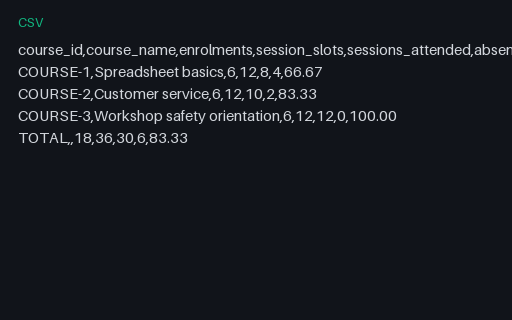
- csvFieldnote Learning Centre: Attendance summary by courseAttendance summary by course for Fieldnote Learning Centre. 3 courses and a TOTAL row. Attendance is uneven: 66.67 percent on Spreadsheet basics, 83.33 on Customer service and 100.00 on Workshop safety orientation, 83.33 overall. session_slots is enrolments times 2 on every row and sessions_attended plus absences equals it.
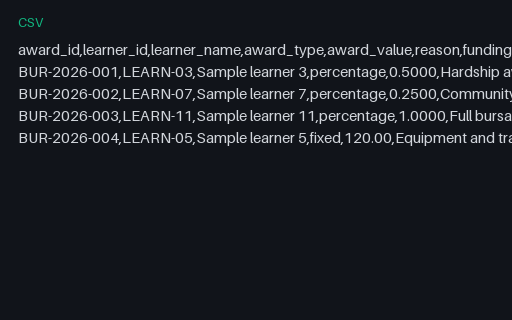
- csvFieldnote Learning Centre: Bursary award registerBursary award register for Fieldnote Learning Centre. 4 awards worth 807.50. Three are a percentage of the fee and apply to every enrolment the learner holds; one is a fixed 120.00 award and applies to that learner's earliest enrolment only, capped at the fee. award_value is a rate for a percentage award and an amount for a fixed one, which is why the column mixes 0.5000 with 120.00.
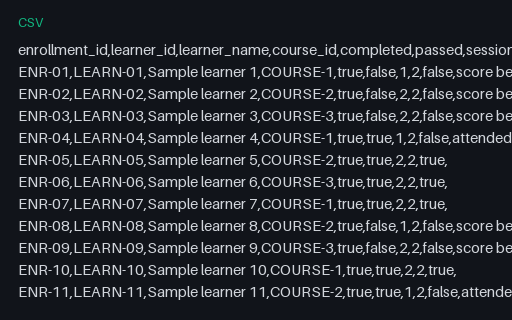
- csvFieldnote Learning Centre: Certificate eligibility with three conditionsCertificate eligibility with three conditions for Fieldnote Learning Centre. All 18 enrolments tested against three conditions: the enrolment is complete, the score reaches the pass mark, and both sessions were attended. 7 are eligible. 9 enrolments passed, so 2 passing learners are still ineligible on attendance alone: ENR-04 and ENR-11, each of whom attended 1 of 2 sessions. Every ineligible row names its reasons.
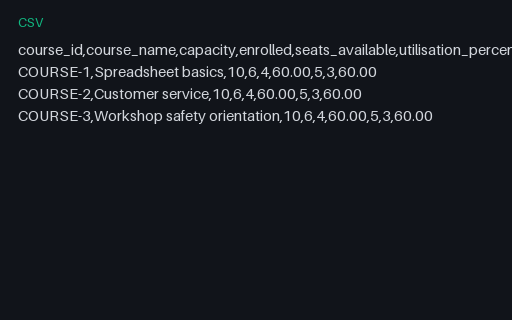
- csvFieldnote Learning Centre: Course capacity and outcome reportCourse capacity and outcome report for Fieldnote Learning Centre. 3 courses, each seating 10 and holding 6 enrolments, so every course is at 60.00 percent with 4 seats free. pass_rate_of_completed divides passes by completions, not by enrolments, which is why COURSE-1 reports 60.00 percent from 3 passes out of 5 completions rather than out of 6 enrolments.
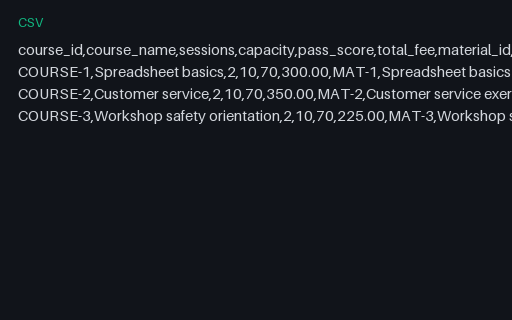
- csvFieldnote Learning Centre: Course catalogue with materialsCourse catalogue with materials for Fieldnote Learning Centre. 3 courses with their fee, capacity, pass score and the exercise material attached to each. material_characters is the exact length of the markdown exercise held against the course in the operating model, from 197 to 253 characters, so a content-length assertion has a real number to check.
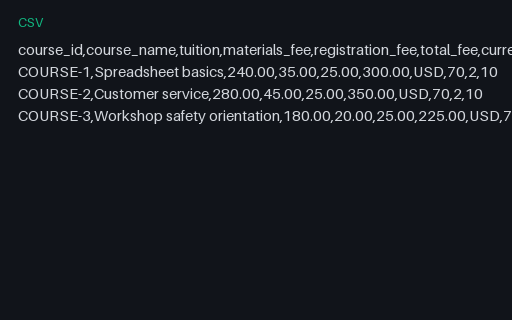
- csvFieldnote Learning Centre: Course fee scheduleCourse fee schedule for Fieldnote Learning Centre. 3 courses with the fee broken into tuition, materials and a flat 25.00 registration charge. The three components add up to total_fee on every row: 300.00, 350.00 and 225.00. Every course runs 2 sessions, seats 10 and passes at 70.
Generated by generation/industry_documents.py. Free for any use, no attribution required, license.