
What Edit Means in Document Studio
Document Studio capability levels explain which edits are real, which are previews, and which jobs still need a sibling app. Ship-only language for authors and QA.
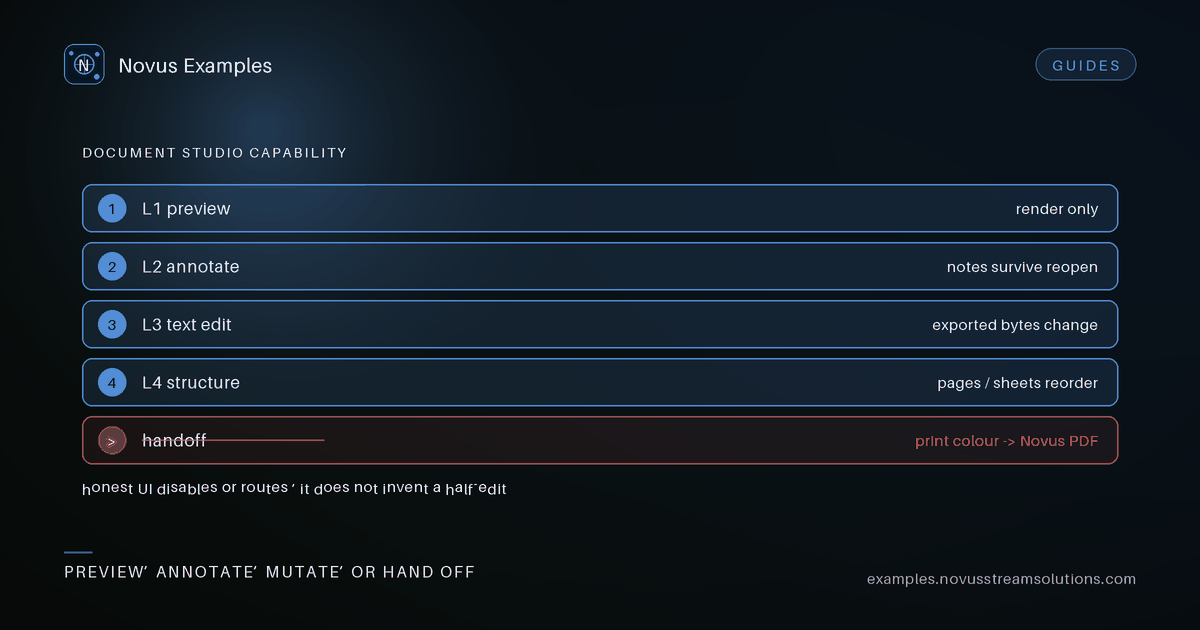
In Document Studio, edit is a family of capabilities with different honesty requirements. Changing visible text is not the same as rewriting a PDF content stream. Annotating a page is not the same as restructuring a workbook. The September expansion work made those levels explicit so fixtures and UI copy stop pretending every file type supports the same operations.
If a surface can only preview, it must say preview. If it can mutate and download, it must say which bytes change. If a job belongs in Novus PDF, Convert, or another sibling, the studio should route there rather than invent a half-edit.
Capability levels are contracts for authors and QA, not marketing adjectives. A fixture tagged for text edit must prove that exported bytes differ in the expected field. A fixture tagged for annotation must prove the annotation survives a reopen in an independent viewer where the format allows it. A fixture tagged for structure edit must prove sheets, pages, or sections reorder without silent data loss.
When a level is absent, the honest UI disables the control or explains the handoff. A greyed button without a reason trains users to think the product is broken. A clear handoff trains them to finish the job in the right tool.
Studio is where you inspect, lightly edit, and prepare fixtures that sibling apps will consume. It is not a replacement for every specialised editor in the Novus estate. That boundary protects users: they get a truthful desk for sample work instead of a fake all-in-one that corrupts files.
Authors should write scenarios that match the level: fix a typo in a sample form label, reorder a short page set, adjust a CSV cell that an importer will read. Do not write scenarios that require print production colour management if Studio does not own that pipeline.
Every studio-oriented fixture should declare the capability it exercises. Ambiguous samples create flaky tutorials. Prefer small files with one intentional defect or one intentional edit target. Large kitchen-sink documents hide which assertion failed.
Pair Studio fixtures with importer packs when the story spans both: edit in Studio, then prove Restaurant or Convert still accepts the result. That chain is more valuable than two disconnected demos.
Inline demonstrations should pause, replay, and honour reduced motion with a final frame rather than a looping blur. Category films on the blog follow the same opt-in pattern used across the estate: poster first, watch on request, captions available. None of that is advertising infrastructure; it is product explanation.
Studio should refuse silent no-ops. If a format cannot support an edit, say so before the user spends time. If an export strips something, name what left. If a sibling app is required, deep-link with the file still local whenever the handoff design allows it.
- Name the capability level under test.
- Provide before and after expectations a human can see.
- State which sibling app owns work beyond that level.
- Keep the file small and rights-cleared.
- Re-run after any Studio dependency upgrade.
When you verify Document Studio capability levels, keep a short checklist: open the live surface, reproduce one happy path, reproduce one refusal, and write down what the UI actually said. Do not upgrade a refusal into a promise. Do not demote a shipped control into optional colour. If a teammate cannot repeat the check from your notes alone, the article is not finished.
When you verify studio fixture authoring, keep a short checklist: open the live surface, reproduce one happy path, reproduce one refusal, and write down what the UI actually said. Do not upgrade a refusal into a promise. Do not demote a shipped control into optional colour. If a teammate cannot repeat the check from your notes alone, the article is not finished.
The companion article on compatibility packs covers importer proofs. Read both if you are maintaining the September expansion surface: Studio teaches what edit means; packs teach what import means; neither should steal the other's vocabulary.
The September expansion program treated blog posts as verification aids, not as announcements. Each article names a shipped surface, a refusal, and a checklist a second person can run without asking the author what they meant. That discipline matters more than adjective density.
If you maintain fixtures or adapters, schedule a quarterly re-read of the linked tools. UI labels drift. Capability matrices gain rows. A post that still describes last quarter's button is worse than no post, because it teaches the wrong click.
When you update the product, update the article in the same change set whenever the claim changes. Dated updated fields are claims about content, not about builds. Do not bump them for whitespace.
Readers who arrive from search deserve the same honesty as readers who arrive from the homepage. Lead with the limit if the limit is the point. Hide the limit and you will spend support time unsaying the article.
Finally, keep media local to the blog paths: posters, captions, transcripts, and opt-in films. Do not couple product explanation to advertising configuration. The films exist to show the feature, not to invent a demand channel.
Continue this workflow
Documentation and troubleshooting
Was this article helpful?
Found an error? Send a correction.
Article record
- Version
- 2026.09
- Updated
- 2026-09-22
- Difficulty
- Intermediate