
The CSV Edge Cases That Break Parsers
Quoted commas, embedded newlines, ragged rows, odd delimiters, and encodings — the CSV cases every parser should survive.
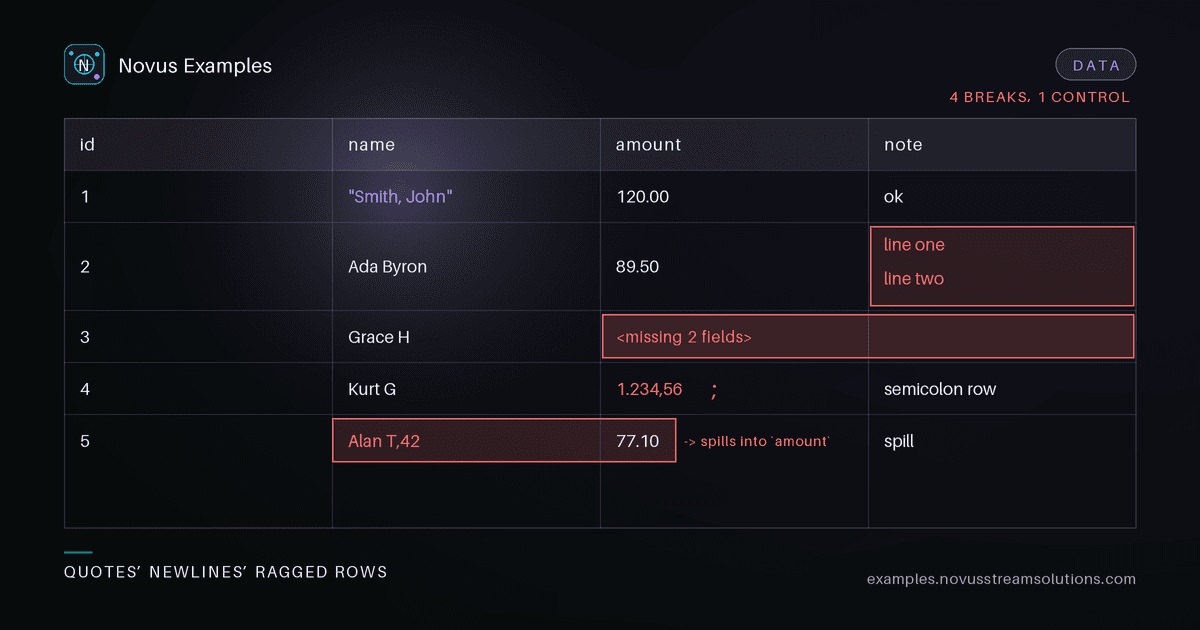
You have seen the demo. Split each line on \n, split each field on ,, ship it. That code works on the file you tested and breaks the first time a customer uploads real data. CSV is not a format so much as a loose family of conventions, and the gap between "parses my sample" and "parses anything" is where production incidents live.
This post walks the edge cases that reliably break naive parsers, and what a robust one should do about each. Every case below maps to a fixture in our CSV parsing fixtures so you can reproduce it before you trust your code.
The trap is that a hand-rolled splitter passes the happy path. Start from a clean CSV baseline: comma-delimited, one line per record, no quoting needed. Your naive parser handles it perfectly, so you assume you are done. You are not. The clean file only proves your parser works when the data never needed a parser in the first place. Treat the baseline as a control, then throw the hard cases at it.
The single most common failure is treating delimiters as unconditional. RFC 4180 says a field wrapped in double quotes may contain commas, newlines, and quotes. The rules:
- A comma inside
"Smith, John"is data, not a field boundary. - A newline inside a quoted field is data, so a single record can span multiple physical lines. This is why splitting on
\nfirst is wrong — you must tokenize quotes and delimiters together. - A literal double quote is escaped by doubling it:
"She said ""hi"""is the valueShe said "hi".
A correct parser reads character by character (or uses a proper state machine), tracking whether it is inside a quoted field. Test it against a deliberately messy CSV that combines all three at once. If your row count changes when you add a quoted newline, your parser is line-oriented and needs replacing.
Real files have rows with too few or too many fields — a trailing column dropped by an exporter, an unescaped delimiter, a manually edited line. Decide your policy explicitly instead of letting an index-out-of-bounds decide for you:
- Too few fields: pad missing trailing columns with empty values, or reject the row. Never silently shift data left.
- Too many fields: reject, or capture the overflow, but surface it. Extra columns usually mean an unquoted delimiter upstream.
Whatever you choose, report the row number. A parser that swallows ragged rows turns a data bug into a silent corruption.
The C in CSV is aspirational. European exporters frequently emit semicolons because the comma is a decimal separator there; TSV uses tabs. Do not sniff blindly — prefer an explicit delimiter option, and fall back to detection only when you must. Validate detection against a semicolon-delimited CSV and confirm you do not misread 1.234,56 style numbers.
Bytes are not text until you pick an encoding. Two failures dominate:
- Latin-1 vs UTF-8: a file saved as Windows-1252 or ISO-8859-1 will mojibake or throw when decoded as UTF-8. Names like
JoséandZürichare where it shows. Test against a Latin-1 encoded CSV and either detect the encoding or let the caller declare it. - BOM: a UTF-8 byte-order mark (
EF BB BF) leading the file leaks into your first header name, soidbecomesidand every lookup misses. Strip the BOM before parsing headers.
Correctness is not enough if the file is large. Loading a 10,000-row CSV into memory is fine; a million-row export is not. A robust parser streams row by row with bounded memory, yields records as it goes, and never buffers the whole file to find line breaks — remember that quoted newlines mean line breaks are not reliable boundaries anyway.
Parsing is only half the job; the other half is deciding what the fields mean, and automatic type inference is where clean data goes to die. Three cases cost real money on a regular basis:
- Leading zeros. A zip code
02134, a product SKU00713, a phone number — inferred as an integer and silently rewritten as2134. Identifiers are strings, always, no matter how numeric they look. - Large integers. IDs beyond 2^53 lose precision the moment they touch a float, which is what happens in JavaScript and in a lot of "just parse it as a number" paths. The value round-trips almost correctly, so it survives review and fails later.
- Ambiguous dates.
03/04/2026is 3 April or 4 March depending on locale, and nothing in the file says which. Detection based on the first few rows will happily pick a convention and then hit a value that contradicts it a thousand rows later.
The defensible default is to parse everything as text and convert explicitly where the schema says to. If your parser must infer, make it inspect the whole column rather than a sample, and make the inferred types visible in the output so a wrong guess is reviewable instead of invisible.
- Quoted commas and quoted newlines
- Escaped (doubled) double quotes
- Rows with too few and too many fields
- Semicolon and tab delimiters
- Latin-1 bytes and a UTF-8 BOM
- A file large enough to force streaming
Grab these cases from the CSV section of the Data library and run them before you ship a parser. Every file is free to use, no attribution required.
Continue this workflow
Was this article helpful?
Found an error? Send a correction.