
Image Format and Conversion Testing, Done Right
Use one source exported across formats — plus a JPEG quality ladder — to test converters and compression.
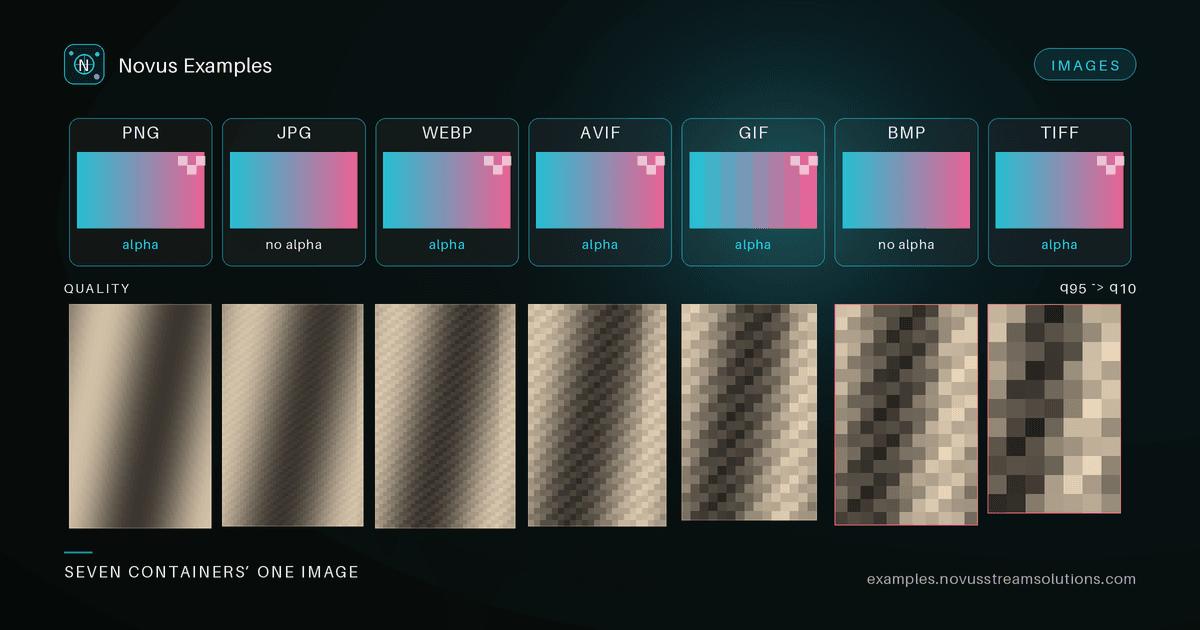
Testing an image converter is deceptively hard. You can run a file through your pipeline, get a valid-looking output, and still have no idea whether the conversion was correct. The output opens, so it "works" — but did the colors shift? Did alpha get flattened onto black? Did a subsampling default quietly halve your chroma resolution? Without a reference, you are guessing.
The fix is a conversion set: one piece of source content exported into every format you care about, so each output has an expected twin you can diff against. Our conversion test fixtures are built exactly this way, around a single test card rendered identically across formats.
A converter is a function. To test a function, you need known inputs and known-correct outputs. When your PNG, WebP, and AVIF files all carry the same pixels, any difference in a conversion result is attributable to the conversion — not to the fact that you compared two unrelated pictures.
That gives you two testing modes:
- Exact diff for lossless targets. Convert the PNG source to another lossless format and the pixels should match byte-for-byte after decoding.
- Perceptual diff for lossy targets. Convert to WebP or AVIF and compare against the expected twin within a tolerance (SSIM, or a per-pixel delta threshold), because exact equality is impossible by design.
Not all formats promise the same things. Your tests should assert the guarantees each one makes:
- Lossless raster — PNG, BMP, TIFF. Decoded pixels must survive a round trip unchanged. If a PNG-to-BMP path shifts a single channel, your exact diff catches it.
- Lossy — JPEG, WebP, AVIF. Expect quantization artifacts. Assert against a twin with tolerance, never with equality.
- Palette limits — GIF caps at 256 colors. Feed it a full-color test card and you are really testing your quantizer and dithering, not just the encoder.
- Alpha support — PNG, WebP, and AVIF carry transparency; JPEG and BMP (typically) do not. A correct converter must composite or reject, not silently drop the alpha channel onto an assumed background.
- Modern codecs — WebP and AVIF buy smaller files at equal quality, but decoder support and metadata handling vary. Test that your toolchain actually reads what it claims to write.
Comparing its WebP twin against its AVIF twin at matched quality is a quick way to sanity-check the size-versus-fidelity tradeoff your pipeline is making.
Compression quality is a knob, and you should test the whole range of it — not one lucky setting. A JPEG quality ladder at q10, q50, and q90 gives you three defensible points:
- q10 — heavy artifacts, tiny file. Use it to confirm your decoder survives blocky, low-quality input without choking.
- q50 — the messy middle, where subsampling and quantization decisions show up.
- q90 — near-transparent quality, larger file. A JPEG at quality 90 is a good baseline for "high quality" assertions.
Plot decoded quality (SSIM against the source) against file size across the ladder and you get a curve. Regressions show up as the curve moving the wrong way: same quality, bigger files, or same size, worse quality.
A file named photo.png is not necessarily a PNG. Extensions lie — they get renamed, mislabeled by upload forms, or spoofed. Real format detection reads the signature at the start of the file: PNG's 89 50 4E 47, JPEG's FF D8 FF, GIF's 47 49 46 38, RIFF/WEBP containers, and so on. Rename one of these fixtures and confirm your detector still identifies it correctly.
Format detection has a security dimension that testing usually skips. Image headers declare dimensions, and a small file can declare enormous ones — a few kilobytes of highly compressible pixels claiming 50,000 × 50,000, which becomes several gigabytes the moment something decodes it. Any service that accepts uploaded images needs a limit on decoded size, not just on file size, and the check has to happen after reading the header but before allocating the buffer.
Test that the limit exists and fires cleanly: your pipeline should reject the file with a clear error rather than dying on an allocation failure. The same applies to animated formats, where the frame count multiplies the cost, and to deeply nested or multi-page containers. File size alone is not a proxy for anything here.
- Load the PNG source.
- Run it through your converter targeting WebP at your chosen quality.
- Decode your output and decode its WebP twin.
- Compute SSIM (or a per-pixel delta) between the two.
- Assert the score clears your tolerance. If it fails, inspect the delta map to see where — edges, flat fills, or color transitions each point to a different bug.
Repeat across the format matrix and the quality ladder, and you have coverage instead of hope.
Grab the full conversion set from the Images library — every file is free to use, no attribution required.
Continue this workflow
Was this article helpful?
Found an error? Send a correction.